
As I was working on my MediaTemple Dedicated Virtual web server recently, I discovered that it is necessary to deactivate mail in Plesk on any domain where mail is being handled by a remote mail server (e.g. Google Apps, Exchange Mailserver). This is in addition to changing the MX records on the domain DNS to point to the remote mail server.
If this is not done, email sent from a website on the DV web server to a domain on the same web server will try to deliver it directly instead of checking the DNS MX records and sending the email to the remote web server. For example, assume that the domains example.com and example2.com are hosted on the same DV web server and the latter is using Google Apps to handle email. An email message sent from the example.com website to [email protected] will try to deliver the message directly to example2.com is the mail service is not deactivated instead of consulting the MX records for the domain and sending it to Google Apps. Most likely that email user is not set up in Plesk and you will receive a failure notice that the user [email protected] does not exist.
Deactivate Mail on a Plesk Domain
This is easy to do through the Plesk interface. Just go to the Control Panel for the subscription you want to change and select Change Settings on the Mail tab.
![image_thumb[5]](https://www.abundantdesigns.com/wp-content/uploads/2012/10/image_thumb5.png "image_thumb[5]")
Then uncheck the box that says Activate mail service on domain and click OK.
![image_thumb[4]](https://www.abundantdesigns.com/wp-content/uploads/2012/10/image_thumb4.png "image_thumb[4]")
Deactivate Mail on a Plesk Subdomain
Usually subdomains are created under the same Plesk subscription as their parent domain. In this situation, there is no way within the Plesk interface to independently control mail activation/deactivation of various subdomains apart from their parent domain. Theoretically, I was told that if you activate/deactivate mail on a domain, Plesk is supposed to activate/deactivate mail on all of its subdomains. However, this did not happen on my installation of Plesk 11.0.9. And what if you would like to deactivate mail on one subdomain but not another?
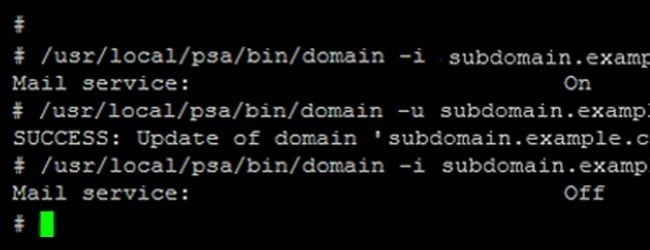
One solution would be to create a separate Plesk subscription for a subdomain instead of allowing it to be under the same subscription as the main domain. However, you can also control domain mail activation through the Linux command line. If you log into your server via SSH you can run the following commands. This will show whether the mail service is activated on the subdomain:
/usr/local/psa/bin/domain -i subdomain.example.com | grep “Mail service”
This will turn off the mail service for the subdomain (Using true instead of false will turn it back on):
/usr/local/psa/bin/domain -u subdomain.example.com -mail_service false
![commands_thumb[3]](https://www.abundantdesigns.com/wp-content/uploads/2012/10/commands_thumb3.jpg "commands_thumb[3]")
These commands were found in comment #8 in the following thread on the Parallels forum: http://forum.parallels.com/showthread.php?t=246172
Saved my life! I was about to bang my head against the wall! Thanks mate!
Perfect. Just what I needed. Thanks for the post on it 🙂
Glad it was helpful, Ryan!
If I have all domains into the same subscription is this command valid also for a domain name (not a sub domain) ?
/usr/local/psa/bin/domain -u mydomain.com -mail_service false
THanks
Thanks for sharing. Unfortunate that it was easier to find on your site than on Parallels website. Forest for the trees thing I guess.
Found this article googling. 🙂 Nice to see your website pop up, Bro! 🙂 I was moving a website and checking to see if PleskMail would interrupt the MX record mail. Thanks!
Hey Andrew! Glad you stopped by. I hope it was helpful! 🙂